
Managing Comments in WordPress
Comments transform a static WordPress website into an interactive community space. Readers share opinions, ask questions, provide feedback, and start meaningful discussions that encourage return visits. Thoughtfully managed comments increase engagement, supply user-generated content that search engines favor, extend time on page, and help foster loyal audiences. Unmoderated comments, however, can invite spam, irrelevant posts, or negative tone that damages user experience and site reputation.
WordPress includes robust built-in tools to control, moderate, reply to, edit, and delete comments with ease. This guide explains the essential steps and best practices so you can promote genuine interaction while maintaining a clean, professional environment. Whether you operate a personal blog, business site, or membership platform, effective comment management creates a welcoming area that supports growth and connection.
Why Comments Add Value to Your WordPress Site
Active, well-handled comments offer multiple benefits:
- Boost user interaction and average session duration
- Generate fresh, relevant content that improves SEO signals
- Deliver authentic feedback to refine content or offerings
- Build stronger relationships when you respond thoughtfully
- Showcase positive social proof through meaningful exchanges
Success depends on smart settings and consistent moderation. WordPress provides flexible controls in the dashboard to achieve the right balance.
Navigate the Comments Management Screen
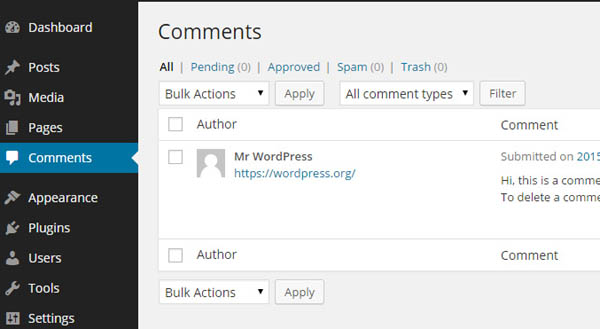
Centralize all comment work in one location. From the WordPress dashboard, click Comments in the left sidebar. The screen displays a table with columns for author, comment text, linked post, date, and status. Pending comments appear highlighted so you can address them immediately.
Hover over any comment to access quick actions: Approve, Reply, Quick Edit, Edit, Spam, or Trash. Select multiple comments with checkboxes and use the Bulk Actions dropdown to approve, spam, or delete several at once for faster workflow.
Control Comment Settings Globally and Per Post
Decide where comments are allowed and how they behave.
Global settings:
- Go to Settings > Discussion.
- Under Default Post Settings, enable or disable Allow people to submit comments on new posts.
- Save Changes to update the entire site.
Per-post control:
- Edit the desired post or page.
- Locate the Discussion panel (enable it in Screen Options if not visible).
- Check Allow Comments to turn them on or uncheck to disable.
- Update or Publish the content.
Many creators keep comments active on blog posts for discussion while turning them off on static pages to focus attention where it matters most.
Moderate Comments for Quality and Safety
Moderation maintains healthy conversations. Configure rules in Settings > Discussion:
- Require manual approval for every comment or only for first-time commenters
- Hold comments that contain specific words, phrases, or excessive links
- Send email notifications for new comments so you stay informed
- Enable Gravatar support for automatic user avatars
Daily actions include:
- Approving legitimate comments to make them public
- Replying directly to show appreciation and continue the dialogue
- Editing for clarity, grammar, or to remove inappropriate elements
- Marking spam for obvious junk
- Trashing off-topic or harmful entries
The Activity widget on the dashboard highlights recent pending comments for quick review.
Combat Spam Effectively
Spam remains a common issue with open commenting. Activate the free Akismet plugin (often pre-installed) and obtain an API key to filter most spam automatically.
Extra spam prevention strategies:
- Require users to be logged in before commenting
- Limit the number of links allowed in a comment
- Set comment moderation queues for suspicious patterns
- Regularly review and empty the Spam folder
With Akismet running and basic moderation rules in place, legitimate comments reach you while spam is caught early.
Best Practices for Building Stronger Conversations
Encourage participation and show readers their input matters:
- Reply promptly and respectfully to every meaningful comment
- Ask open-ended questions to deepen discussions
- Thank contributors for valuable insights or support
- Pin or feature standout comments
- Close comments on older posts to reduce spam risk
Consistent engagement signals that your site values community, which increases loyalty, shares, and return traffic.