
Common FTP Connection Issues
Issues like connection timeouts, authentication failures, or access denials can stem from incorrect settings, server restrictions, or network problems.
Below, we outline solutions to get you back on track.
Troubleshooting Steps
Verify FTP Account Details
Incorrect credentials are a common issue.
Log in to cPanel at https://yourdomain.com:2083.
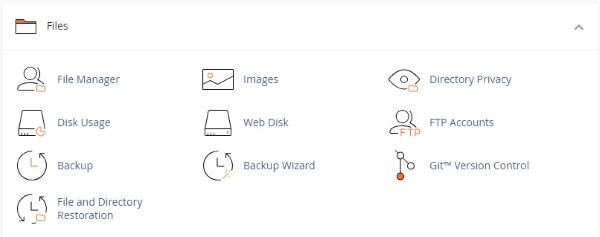
Go to Files > FTP Accounts.
Check your FTP account’s username, password, and directory (e.g., public_html).
If needed, reset the password by clicking Change Password next to the account.
Check FTP Client Settings
Ensure your FTP client is configured correctly:
Open your FTP client (e.g., FileZilla).
Go to File > Site Manager.
Confirm:
Host: yourdomain.com or server IP.
Port: 21 (for FTP) or 22 (for SFTP).
Protocol: FTP or SFTP (if SSH is enabled).
Username/Password: Matches your cPanel or FTP account.
Test the connection.
Monitor Active Connections
Server limits or existing sessions may block connections.
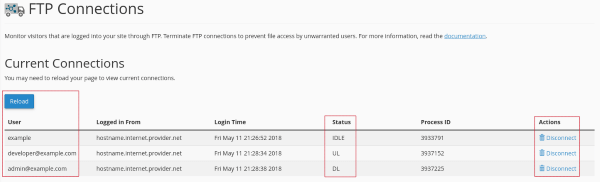
In cPanel, go to Files > FTP Connections.
Review active FTP sessions.
Disconnect any unnecessary sessions by clicking Disconnect.
Check Firewall and Network Issues
Firewalls or network restrictions can prevent connections.
Ensure port 21 (FTP) or 22 (SFTP) is open on your local network.
Test your server’s FTP service:
Try switching between Active and Passive FTP modes in your client settings.
Use ftp yourdomain.com in a command prompt or terminal.
If it fails, contact Support Services to verify server status.