
Automate FTP Transfers saves time and reduces errors for tasks like nightly backups or syncing files.
Using scripts with tools like curl or lftp, combined with cPanel’s cron jobs, you can schedule secure file transfers with minimal effort.
Steps to Automate FTP Transfers
1. Create an FTP Script
Create a Bash script to automate file transfers using lftp, a reliable FTP client for scripts.
On your local computer or server, open a text editor and create a file named ftp_upload.sh.
Add the following script, replacing placeholders with your details:
#!/bin/bash
HOST='yourdomain.com'
USER='your_ftp_username'
PASS='your_ftp_password'
TARGET_DIR='/home/username/public_html'
LOCAL_DIR='/path/to/local/files'
lftp -u $USER,$PASS $HOST EOF
cd $TARGET_DIR
lcd $LOCAL_DIR
put file_to_upload.txt
bye
EOF
Save the file and make it executable: chmod +x ftp_upload.sh.
2. Test the Script
Ensure lftp is installed on your system (e.g., sudo apt install lftp on Linux or equivalent).
Run the script locally: ./ftp_upload.sh.
Or use this online test envirment at jdoodle.com
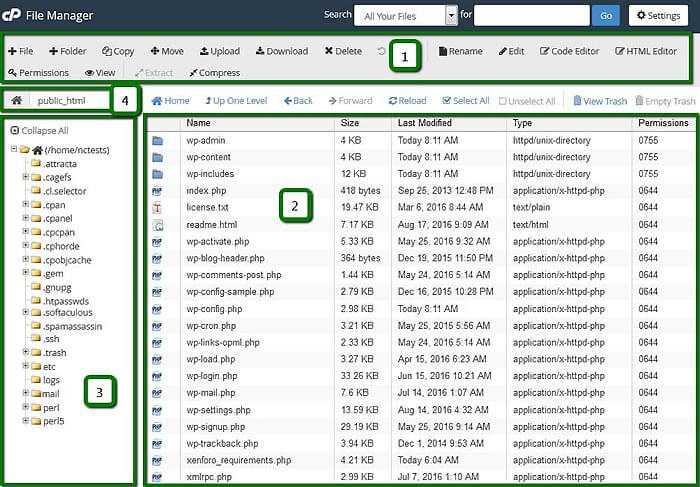
Verify the file (e.g., file_to_upload.txt) appears in your cPanel account’s public_html directory "File Listing Section" (2) using cPanel’s File Manager.
3. Schedule the Script with a Cron Job
Schedule the script to run automatically in cPanel:
Log in to cPanel at https://yourdomain.com:2083.
Go to Advanced > Cron Jobs.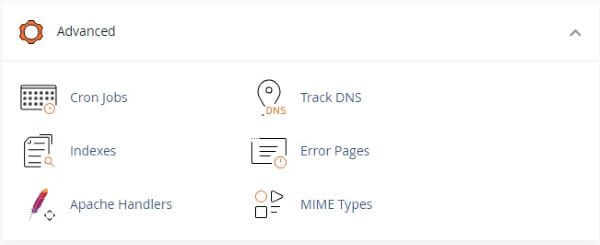
In Add New Cron Job, set the schedule (e.g., 0 2 * * * for daily at 2 AM).
Note: Upload the script to your server via cPanel’s File Manager or FTP first.
In the Command field, enter the path to your script (e.g., /home/username/ftp_upload.sh).
Click Add New Cron Job.
4. Verify Automation
Wait for the cron job to run or manually trigger the script.
Check the target directory in cPanel’s File Manager or via FTP to confirm files transferred.
Monitor cron job logs in cPanel (Cron Jobs > View Cron Email) for errors.
Troubleshooting
Script Fails: Verify lftp is installed and credentials are correct.
Cron Job Not Running: Check cron email logs or ensure the script path is accurate.
Permission Denied: Confirm the FTP account has access to the target directory.
Contact Support for assistance.