
What Are WordPress Manage Sets?
A WordPress Manage Set is a curated bundle of plugins and themes that you assemble once and then install on any WordPress installation through Softaculous. Instead of installing each plugin and theme individually, a set lets you apply a preferred configuration in one step. This feature is especially useful for developers, agencies, and power users who standardize setups across multiple sites.
How to Create a Manage Set
The process to craft your own set is simple and supported directly within the Softaculous Enduser panel. Below is the complete method to build a set from scratch.
Log into your cPanel
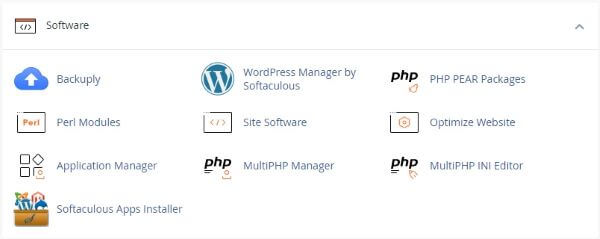
Click the Softaculous App Installer link in the Software section.
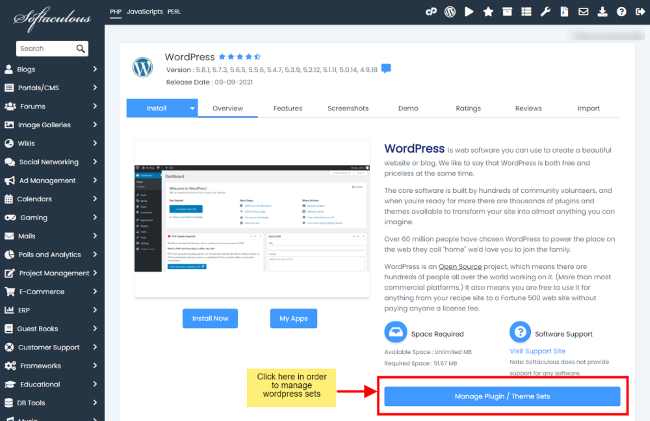
- Navigate to Manage Plugin/Theme – Find the WordPress overview and choose the Manage Plugin/Theme option where set tools are located.
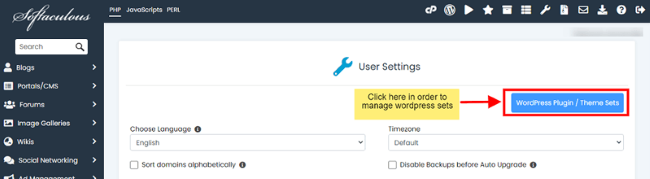
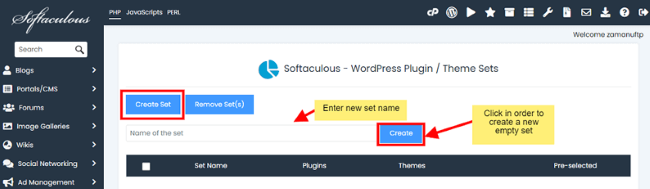
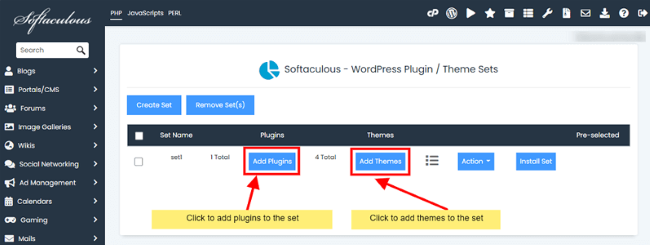
- Create New Set – Click Create Sets, enter a name, and confirm to make a new blank set. The set will then appear in your list of available sets.
- Add Plugins and Themes – Use Add Plugins and Add Themes buttons to search and include desired tools in your set. Each selection is added immediately to your group.
Managing Your Sets
Once created, sets can be edited to maintain relevance or cleaned up when they are obsolete. You can also deploy a set to multiple sites quickly and remove elements if needs change.
- View Set Contents – Click the view icon to see the plugins and themes currently stored in any set. This helps confirm contents before installation.
- Remove Items – Using the Actions button, you can remove selected plugins or themes from a set to keep it updated and relevant.
- Install Sets on Sites – Choose Install Set and select one or more WordPress installations to apply all bundled items in one action. The set deploys plugins and themes automatically.
- Clean Up Sets – Delete older sets that are no longer needed to maintain an organized list of current configuration groups.
Why Use Manage Sets
Manage Sets improves workflow, especially when creating multiple sites with similar tool stacks. By saving time, reducing repetitive steps, and ensuring consistency across installations, sets become invaluable in professional WordPress management. Using sets also helps enforce standards across teams or client projects, making site rollouts more predictable and reliable.