
This feature allows you to view all of your mailboxes and remove old or large messages
Account
Select the account to modify from the Account menu.
Note: The Account menu only appears for cPanel accounts. It will not appear in Webmail accounts.
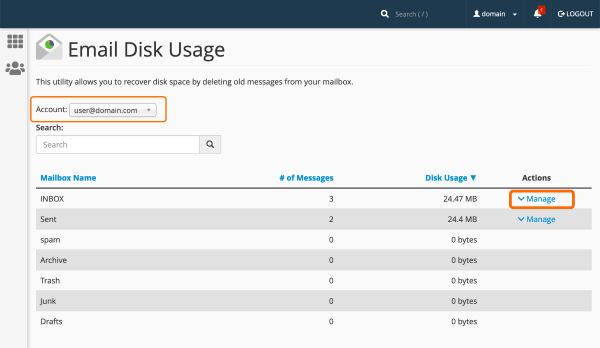
Search
Use the Search text box to search for specific mailbox names.
The mailboxes table
The mailbox table contains a list of mailboxes. You can sort this information by the name, number of messages, or disk usage.
Mailbox Name - The name of the mailbox.
# of Messages - The number of messages for the address or in the mailbox folder.
Disk Usage - The disk usage for each address or mailbox, in bytes, kilobytes (KB), megabytes (MB), or gigabytes (GB).
Remove messages
To remove messages, perform the following steps:
1) Click Manage.
Select one of the following removal options from the menu:
• 1 year old or more
• 30MB in size or more
• Previously viewed
• All messages
• Custom query - This option allows you to customize your removal option with the Dovecot search query format.
For example, to remove all messages larger than 10MB, select this option and enter larger 10M in the text box.
For more information about how to use the Dovecot search query format, read Dovecot’s Search Query Format documentation.
Click - "Delete Permanently"