
Script Demos

How To Demo a Script Before Installing With Softaculous

Script Demos

You may view any script demos at the Official Softaculous Website

Or

Viewing Demo scripts within cPanel

1) Log in to cPanel.

2) Select the “Softaculous Apps Installer” from the “Software” section.

3) Select your preferred script from the categories on the left-hand menu.

4) On the script's page, select the Demo tab

5) Softaculous will then launch its demo version.

Or
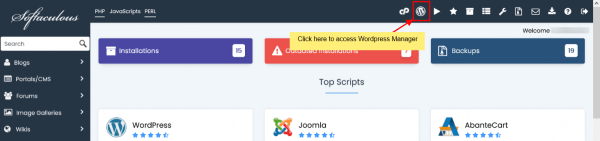

Log in to cPanel.

2) Select the “Softaculous Apps Installer” from the “Software” section.

3) At the top click on the icon "Script Demos"

4) A new window will open

5) Click on a scripts logo to view the demo of that script.

  • 0 brukere syntes dette svaret var til hjelp
Var dette svaret til hjelp?

Relaterte artikler

Edit Settings

Softaculous Edit Settings Icon User Settings WordPress Plugin / Theme Sets IconShows what Themes...

Email Settings

How to Change Your Email Settings in Softaculous Log into cPanel and then click the Softaculous...

How to Restore a Backup

Log into your cPanel Click the Softaculous link in the Software section. Click the Backup link,...

Importing WordPress or Apps into Softaculous

The Import Installations feature in Softaculous will help you to import a installationSuch as...

Installing A Script With Softaculous - WordPress

Installing a Script with Softaculous. Our example is WordPress which is a popular blogging...